1 · Open
Open Bello Box to explore Home, with Overview, Developer, Capture, and Text & AI categories. From any app, use the shortcut to open the focused command palette with your selected text.
Home: ⌘1–⌘4 · Palette: ⌃⌥⌘B
Press ⌃⌥⌘B to search 61 commands for coding and everyday work. Calculate, convert units, check colors, preview Markdown, generate code from JSON, inspect text, or explore network and security utilities. Your selected text suggests relevant tools. Screenshots, recordings, World Clock, QR codes, text utilities, and configurable AI are all in the same palette.
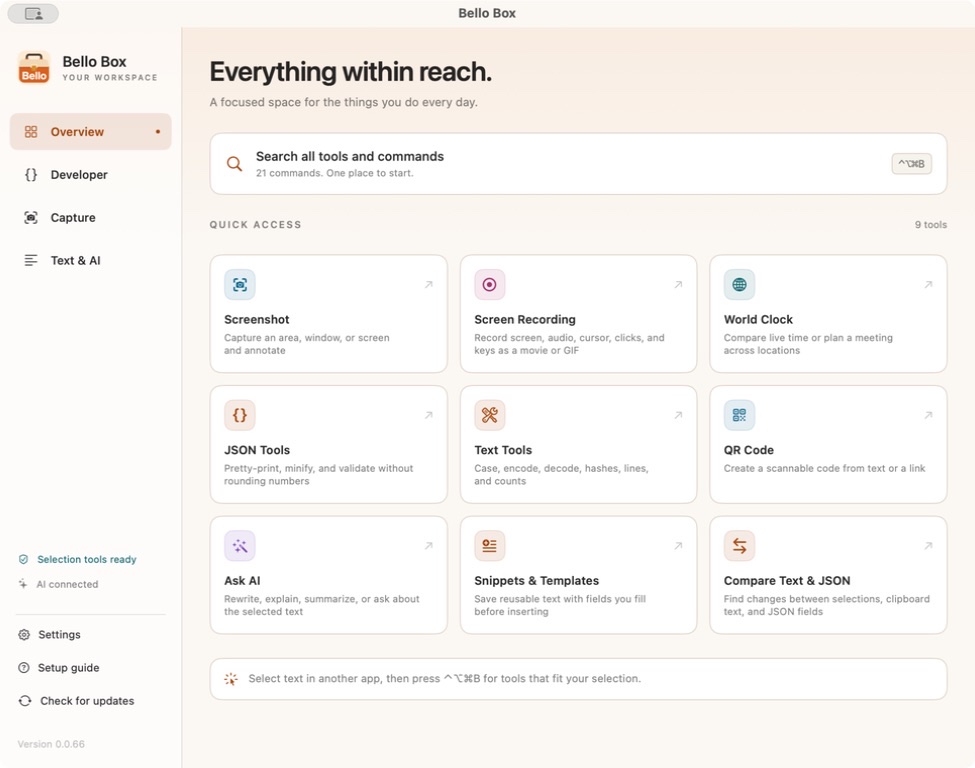
Version 0.0.76 brings much clearer glass across the whole app. Home, Settings, the palette, World Clock and tool panels now share translucent cards, editors, results and native selection menus in both light and dark mode. Window backgrounds extend behind the title bar and scrolling edges, with stronger text and lighter borders. Glass and Solid remain separate choices, and accessibility settings automatically use solid surfaces. All 61 commands remain available, with automatic updates through Sparkle.
Open Bello Box to explore Home, with Overview, Developer, Capture, and Text & AI categories. From any app, use the shortcut to open the focused command palette with your selected text.
Home: ⌘1–⌘4 · Palette: ⌃⌥⌘B
The most relevant tool starts expanded, with frequent choices prioritized for the kind of text you select. Move with ↑ and ↓ to expand another tool; the previous row collapses. Use live controls to format JSON, edit a QR code, compare text, or adjust tool options directly in the result. Scroll and copy the output, then press Return to open the full tool with your draft intact. Suggestions learn from tool choices and broad text categories; selected text is never stored in ranking history.
Search · ↑ ↓ · Return · ⌘K
Inspect and copy your result, replace a captured selection, or chain supported transforms with Use as Input. Drafts stay available while switching tools. Click elsewhere or press Esc from the tool list to close the palette.
Copy · Replace
Home, Settings, the palette, and tool windows share consistent surfaces, colors, icons, and controls in light and dark themes. Search remains immediately focused, with arrow-key navigation and click-away dismissal. Developer tools preserve drafts while switching, and selections up to 500 KB stay intact behind a compact preview.
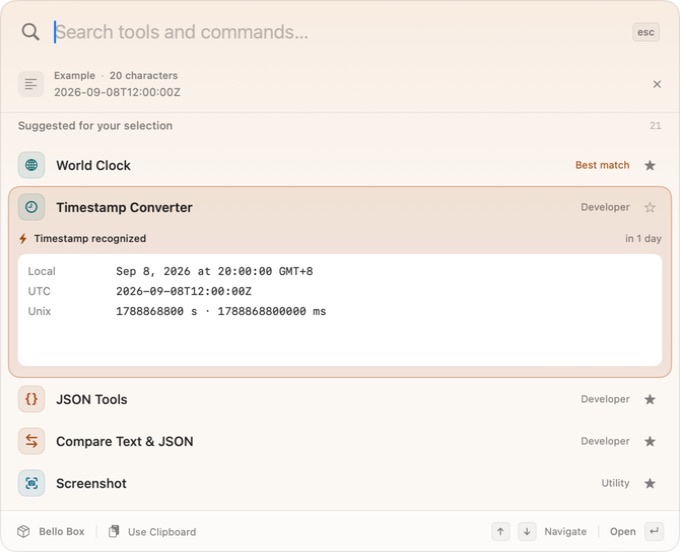
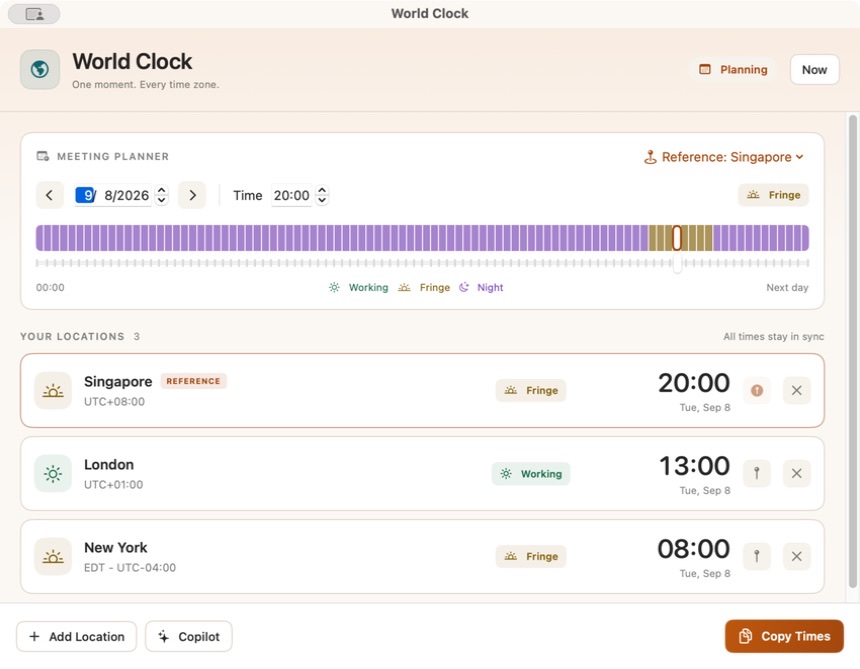
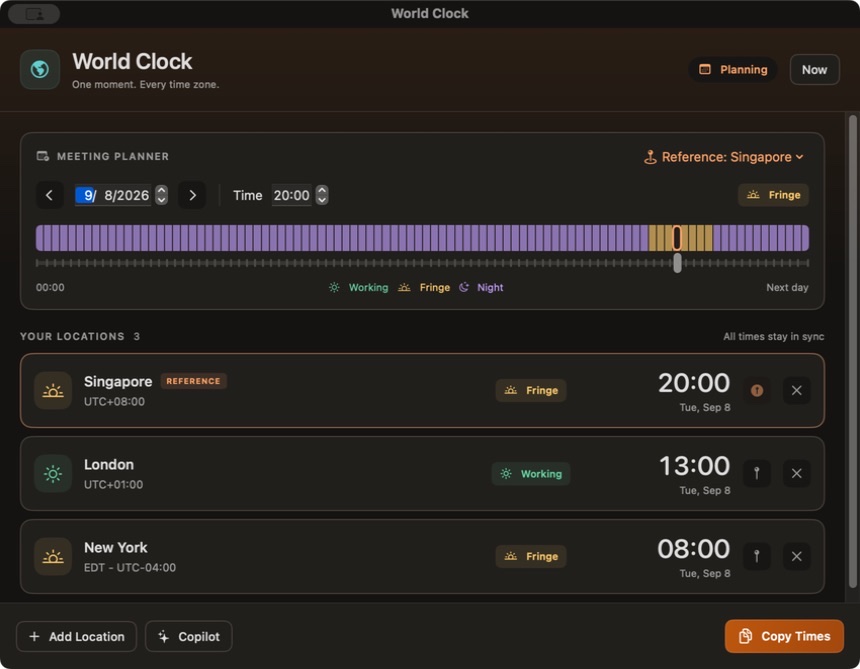
Compare synchronized times and scroll or drag the timeline to plan a meeting. Adjust a timestamp directly in the palette, then press Return to continue with the same time and reference city. Open the copilot with ⌘J to ask your configured AI provider about the current time and locations. Questions send only when you choose, and suggestions require Apply. Pick Light, Dark, or System in Settings; open windows update immediately.
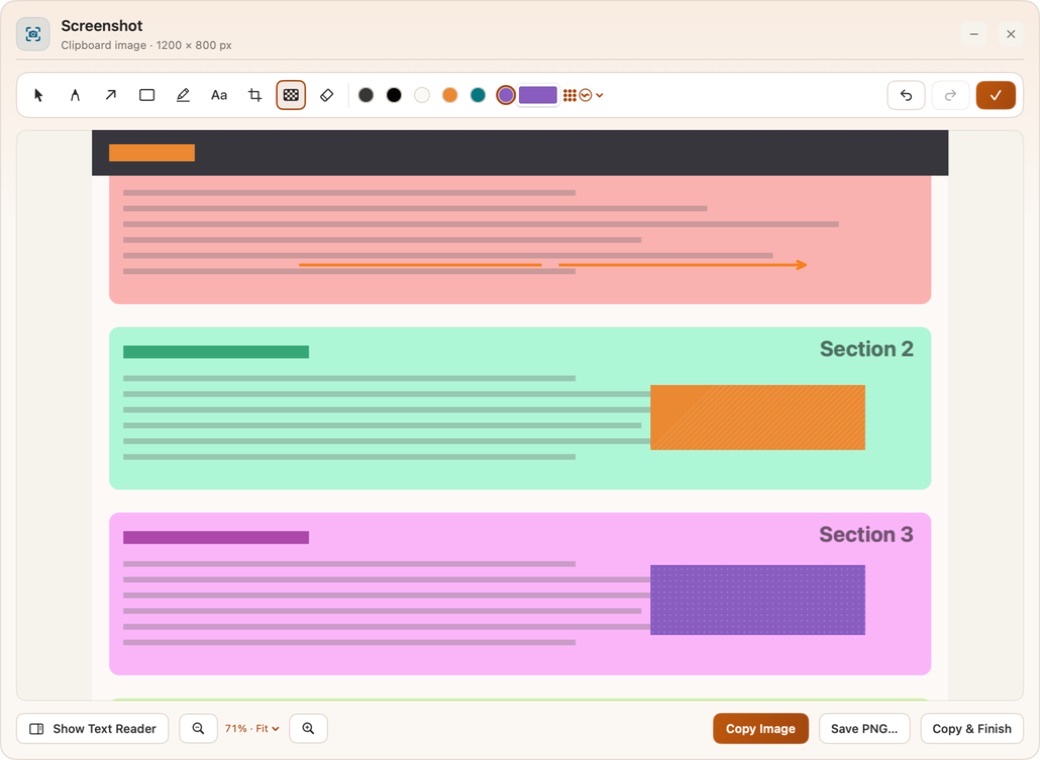
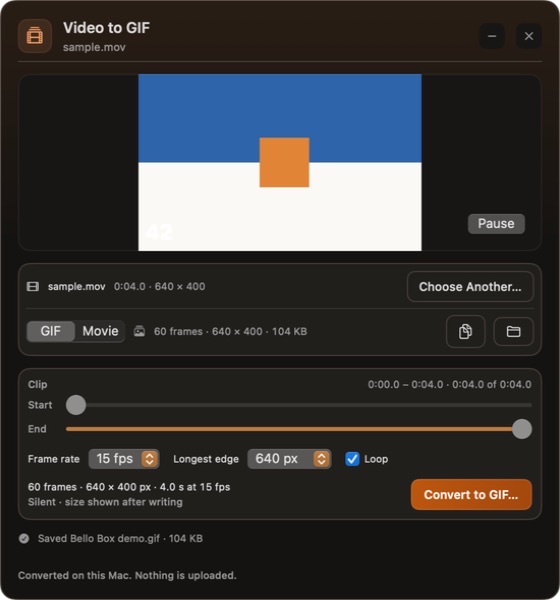
Read a scrolling screenshot from top to bottom, style opaque masks, and erase just the parts of annotations you touch. Record a movie or GIF, or turn an existing video into a trimmed GIF with a live preview.
Transformations run on your Mac. HTTP requests run only when you choose Send; request and response history is not saved.
Pretty-print, minify, validate, and sort keys while preserving large numbers exactly. Malformed input shows a useful error location.
Compare lines, words, or JSON fields with visible additions and removals. Pin one selection and compare it with another later.
Read token headers, claims, and expiration dates locally. Signature verification is clearly distinguished from decoding; encrypted tokens are not supported.
See live ICU matches and capture groups, highlight matches, extract results, or preview replacements. Bounded processing keeps difficult patterns responsive.
Edit the host, port, path, fragment, and query parameters. Repeated parameters and flags stay intact, with a rebuilt URL ready to copy.
Convert Unix seconds, milliseconds, and ISO dates, or compare two instants. Explain standard five-field cron and preview the next runs in a chosen time zone.
Convert structured data and inspect a table preview. Choose CSV delimiters and optional type inference; ambiguous YAML structures produce clear errors.
Save reusable text on your Mac. Fill custom fields and use selection, date, timestamp, and UUID placeholders before copying or inserting.
Import a literal cURL command without executing a shell. Edit the request, explicitly choose Send, and inspect status, headers, body, and redirects. Cancel requests at any time.
Generate UUIDs, secure random strings, Unix timestamps, and synthetic records. Choose line, JSON, or CSV output and regenerate when needed.
See more of your desktop through native frosted windows, cards and controls, with warm orange details in light and dark mode.
The palette, Home, Settings, World Clock and tool panels share glass surfaces through their cards, inputs, results, title bars and scrolling edges. Dropdowns keep native keyboard navigation with matching translucent backing.
Choose System, Light or Dark, then Glass or Solid independently. Stronger text stays crisp, and QR quiet zones, screenshots and media keep their original pixels. Reduce Transparency and Increase Contrast use solid surfaces automatically, preserving your preference. Live changes retain text drafts, focus and undo.
Search 61 commands, or use Home’s new group and release filters. Edit in the highlighted result, then press Return for the full editor with the same draft. Everything below runs locally.
JSON Schema Validator checks a declared 2020-12 subset and reports unsupported constraints. JSON Merge Patch previews changes. JSON Field Redactor replaces matching field names. JSON Lines converts records and arrays. CSV Explorer filters rows and columns while keeping complete exports.
Environment File converts literal assignments and JSON. Property List Converter preserves dates and binary data through typed JSON. SQL Formatter lays out PostgreSQL, SQLite, and MySQL text without executing it. Text Table Builder exports Markdown, plain text, or escaped HTML.
HTTP Header Inspector and Cookie Inspector keep ordered, repeated fields. Certificate Inspector shows public certificate details and validity dates. SSH Public Key Inspector checks key structure and fingerprints. UUID Inspector reveals versions, variants, and embedded timestamps. These tools do not access browser storage or make network trust checks.
Bitwise Calculator displays fixed-width words. Statistics Calculator adds percentiles and histograms. Date Calculator handles calendar arithmetic in a chosen time zone. Aspect Ratio Calculator previews proportional sizes. CSS Bézier Curve offers draggable easing handles, and CSS Box Shadow previews soft shadows.
Edit directly in the highlighted search result. Press Return for the full editor with the same draft. Every tool below runs locally, with useful examples and no additional libraries.
Calculator handles expressions and functions. Unit Converter covers six measurement families. Number Base Converter keeps integers exact beyond 64 bits.
Color Converter shows HEX, RGB, and HSL. Contrast Checker previews text with AA/AAA results. CSS Gradient Builder makes a live gradient. Markdown Preview renders common Markdown and exports safe HTML without loading remote images.
JSON Pointer extracts values. Flatten & Unflatten JSON round-trips typed paths. JSON to Code infers TypeScript or Swift models. SQL INSERT Builder generates quoted statements without executing them. XML to JSON preserves ordered elements, attributes, and mixed text.
Unicode Inspector reveals code points and normalization. String Literal Escaper quotes JSON, Swift, and shell text. Extract Links & Emails collects matches. List Set Operations compares line lists. Semantic Versions sorts and compares releases and prereleases.
IPv4 Subnet Calculator shows address ranges and host counts. Chmod Permissions provides an interactive permission grid and copyable command. HMAC Signer supports SHA-256/SHA-512 with a masked, temporary key. These tools never send data or change files.
Works with OpenAI-compatible Chat Completions or Responses API endpoints — including OpenAI, OpenRouter, Groq, together.ai, or local runtimes like Ollama and LM Studio. Set the base URL, request API, model, and key.
Talk directly to the Anthropic Messages API or a compatible gateway with an x-api-key header and your chosen model.
Override the endpoint and model, edit the system prompt that shapes every transformation, load the model list from the endpoint, and verify it with a "say hi" connection test. Keys live in the macOS Keychain.
Already use Codex locally? Point Bello Box at the codex binary and it talks to codex app-server with your existing login and config — no API key required.
Fix spelling and grammar, improve clarity, make text shorter, or switch to a professional or friendly tone — each a single click.
Summarize a long passage, explain what something means, or translate it into natural English.
Type a custom instruction for one-off transformations — reformat a list, draft a reply, tighten a sentence.
Turn a link, address, or any text into a scannable QR code. Open it from the home window or a text selection, paste or edit text live, then copy or save the image as a PNG.
Capture an area, window, screen, or scrolling page. Ordinary captures freeze the display when triggered, preserving hovered menus and tooltips. Scrolling Capture guides manual or automatic scrolling and shows the captured extent. Review the tall result with Fit, Fit Width, or a chosen zoom. Annotate with arrows, highlights, text, and opaque masks in solid colors or patterns. Brush away portions of annotations while preserving the screenshot beneath, with undo and redo. OCR runs only when requested.
Record an area, window, or screen as a movie or silent GIF. Compact controls keep audio, cursor, click and keyboard tracking, quality, countdown, and privacy options together. Pause or change input tracking while recording. Review the result, make another GIF, or save and copy either format; GIF conversion keeps the original movie.
Choose a local movie, preview and trim a clip, then set its frame rate, size, and looping. Convert up to 120 seconds at a time with progress and cancellation, and preview the finished GIF. Everything stays on your Mac.
Offline tools that need no AI: convert case, encode or decode Base64 / URL / HTML / Hex (auto-detected), pretty-print JSON and XML, hash with MD5 / SHA, sort and dedupe lines, and count words, characters, and model-aware tokens. Type or paste text directly, chain transformations with Use as Input, and reset to the original text.
Follow the current time or plan an exact meeting time across locations with a draggable, color-coded timeline. Date-difference labels make midnight crossings clear, and Copy Times shares every location with its date and UTC offset. Search cities and IANA time zones, or explicitly ask your configured AI provider to fill a meeting from a description.
Bello Box needs Accessibility access to read your selection and paste replacements. Screenshots and recordings need Screen Recording access, and recordings may also ask for Microphone and Input Monitoring depending on your selected options. Developer tools need no AI setup. AI features use your configured provider or local Codex app-server. Designed for macOS 13 and later.
Bello Box remains a beta. Automatic selection capture depends on the source app exposing selected text through Accessibility; copy and Use Clipboard are available when it does not. Cron uses five fields, cURL imports common literal request options, and JWT inspection does not verify signatures.